


Typography in graphic design is the art and craft of arranging type — choosing typefaces, sizing, spacing, and pairing them — so text is both readable and expressive of a brand’s tone. It’s not just “picking a nice font.” Typography decisions affect how fast someone can read a page, whether a brand feels premium or playful, and whether a message gets taken seriously at all.
Typeface vs. font: the distinction that actually matters
A typeface is the overall design (Helvetica, Georgia, Montserrat). A font is a specific weight and style within that typeface (Montserrat Bold Italic, 24px). In practice most people use the words interchangeably, but the distinction matters when you’re building a type system: you’re choosing a typeface family first, then deciding which weights and sizes you actually need.
Serif vs. sans-serif
Serif typefaces (Georgia, Times New Roman, Playfair Display) have small strokes at the ends of letters and tend to read as traditional, editorial, or trustworthy — common in print, publishing, and legal or financial branding. Sans-serif typefaces (Helvetica, Inter, Montserrat) drop those strokes and read as modern, clean, and digital-first — the default for most tech and startup branding, and generally easier to read at small sizes on screens.
The core principles of good typography
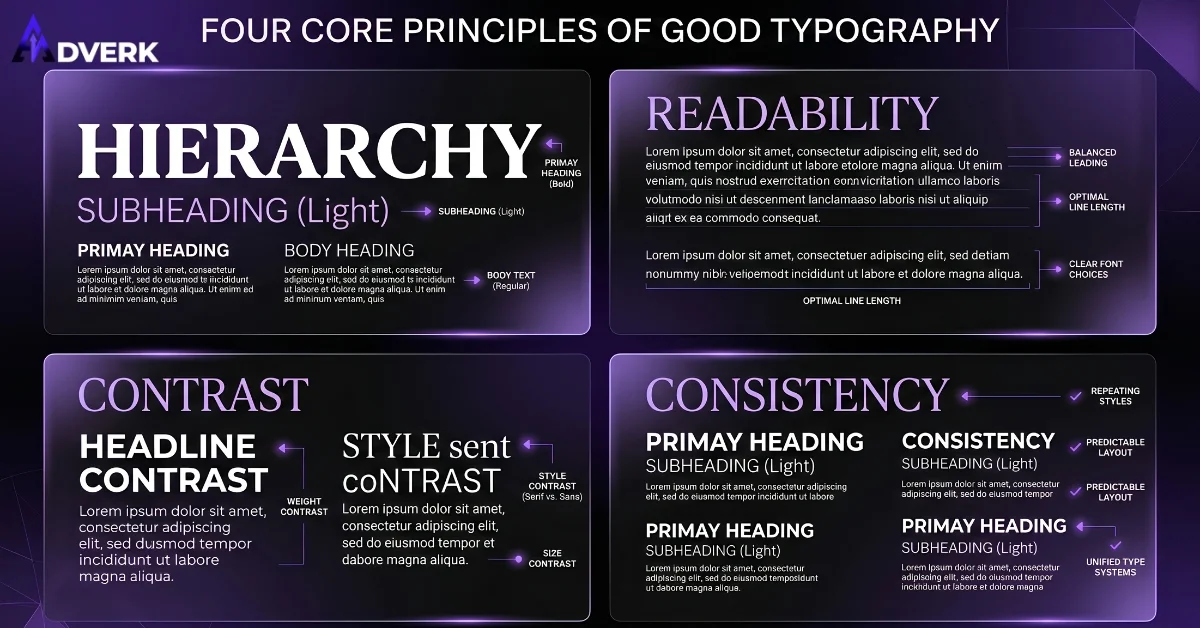
Hierarchy: headings, subheadings, and body text should be visually distinct at a glance, through size, weight, or color — not all three competing at once. Readability: line length, line height (leading), and letter spacing (tracking) all affect how comfortably someone can read a paragraph; lines that are too long or too tightly packed cause readers to lose their place. Contrast: enough size or weight difference between heading and body text that hierarchy is obvious without a caption explaining it. Consistency: the same type system used across every page and touchpoint, not a different font on every flyer.
How many typefaces should a brand use?
Two is the practical standard for most businesses: one for headings (with more personality) and one for body text (optimized purely for readability). A third can work for accents or numerals if there’s a genuine reason. Beyond that, most brands start looking inconsistent rather than sophisticated — every additional typeface is another thing that has to be intentionally justified, not just added because it looked interesting in isolation.
Common typography mistakes
Using more than two or three typefaces in one design. Setting body text below 16px on web (a real readability and accessibility problem, not a style choice). Centering long paragraphs of body text, which makes the eye hunt for the start of each new line. Using low-contrast color combinations (light gray text on white) that look elegant in isolation but are genuinely hard to read. And relying on a default system font because a real typeface was never chosen — which, more than almost anything else, makes a brand look unfinished.
Typography as part of a bigger system
Typography doesn’t operate alone — it’s one of several tools graphic designers combine with color, imagery, and layout to build a brand identity. If you’re building out a full visual system, it’s worth understanding how type fits alongside the other elements of graphic design and how principles like hierarchy and contrast apply specifically to type.
Frequently Asked Questions
Is it ever okay to use more than two typefaces?
Occasionally, for a specific accent purpose like numerals or a small decorative detail — but it needs a real reason, not just visual variety. Past two typefaces, most brands start looking inconsistent rather than intentional.
What’s the minimum readable font size for body text on a website?
16px is the practical floor for web body text — below that, readability and accessibility both suffer, especially on mobile screens. This isn’t a style preference; smaller sizes measurably slow reading and strain the eyes.
Why does line height matter as much as font size?
Line height (leading) controls how easily a reader’s eye finds the start of the next line. Text set too tight feels cramped and hard to track; text set too loose feels disconnected — both slow reading down even if the font size itself is fine.
Should headings and body text always use different typefaces?
Not required, but it’s the most common and reliable approach — one typeface with more personality for headings, one optimized purely for readability for body text. A single typeface can work if it has enough weight variation to create clear contrast between the two roles.
What’s the fastest way to tell if a site’s typography is hurting credibility?
Check whether headings, subheadings, and body text are instantly distinguishable at a glance, and whether body text holds up at actual reading size on a phone. If everything blurs together or you have to zoom in, that’s usually enough to make a site feel unfinished regardless of the content itself.
A weak or inconsistent type system is one of the fastest ways a brand loses credibility online, often without anyone being able to say exactly why a site “feels off.” Adverk’s graphic design services include building a proper typographic system as part of brand identity work. Book a free consultation if your current type choices need a second look.