
UI/UX design is the work of shaping how a website, app, or dashboard actually feels to use — the layout, the buttons, the flow from one screen to the next, and whether a visitor gets to the action you want without friction. It’s a different job from general web design, and for a lot of Pakistani businesses, it’s the piece that’s missing even when the visual design itself looks fine.
This guide breaks down what UI/UX design actually covers, how it’s different from the landing page or full-website design work most agencies talk about, and how to tell whether your business needs it right now.
What UI/UX Design Actually Means
UI and UX get used almost interchangeably, but they cover two different layers of the same experience.
UI (user interface) is the visible layer — buttons, icons, forms, colors, spacing, and how everything is laid out on the screen. UX (user experience) is how smooth the overall journey feels — whether someone can find what they need, understand what to do next, and complete a task without getting stuck or confused.
A screen can look polished (strong UI) while still being confusing to actually use (weak UX), and the reverse is just as common: a simple, plain-looking flow that gets people through a booking or signup faster than a more “designed” one ever could. Good UI/UX design work handles both layers together, because fixing one without the other rarely solves the underlying problem.
How This Is Different From Regular Web Design
General web design — the kind covered in a typical website redesign — usually focuses on a fixed set of pages: home, about, services, contact. It’s about how the site looks and reads page by page.
UI/UX design is broader and more structural. It applies to any interface where someone moves through a sequence of steps — a signup flow, a multi-step booking form, a dashboard with several screens, a mobile app with dozens of interactions. The core question isn’t “does this page look good,” it’s “can someone complete what they came here to do, and does it feel effortless while they’re doing it.”
That’s why UI/UX design work often sits upstream of both website design and development — it defines how something should behave before anyone finalizes how it should look or starts building it.
What’s Actually Included in UI/UX Design Work
In practice, UI/UX design covers:
- Mapping the user journey — every step someone takes from arrival to completed action
- Wireframing the structure of each screen before visual design starts
- Designing the interface layer — buttons, forms, navigation, icons, spacing, and layout
- Interaction design — what happens on click, hover, scroll, and error states
- Consistency across screens, so the experience doesn’t feel different from one section to the next
The goal across all of it is the same: reduce the effort it takes someone to get from “just arrived” to “did the thing,” whether that’s booking an appointment, completing a purchase, or filling out an inquiry form.
Signs Your Website or App Actually Needs This
A few patterns tend to show up when UI/UX — not just visual design — is the actual problem:
- Visitors land on the site but drop off before reaching a form, checkout, or booking step
- Support gets repeated questions about “how do I actually do X” on the website or app
- A multi-step process (signup, checkout, booking) has a noticeably high abandonment point
- The site or app has grown feature by feature over time and now feels cluttered or inconsistent screen to screen
- Mobile users behave differently than desktop users — shorter sessions, fewer completions, more drop-off
If the issue is mainly that the site looks outdated, the more common signs your website needs a redesign are probably a better starting point than a UI/UX-specific engagement. The two overlap, but they’re solving different problems.
Where This Applies
UI/UX design work is relevant to more than just marketing websites. It’s typically the right fit for:
- Websites with any multi-step process (inquiries, bookings, quote requests)
- Mobile apps
- Dashboards and internal tools
- SaaS platforms
- Booking systems
A single-purpose page built to drive one action — like a campaign page for a Google Ads push — is a different job. That’s landing page design territory, not a full UI/UX engagement, and it’s usually faster and cheaper because the scope is narrower.
How the Process Usually Works
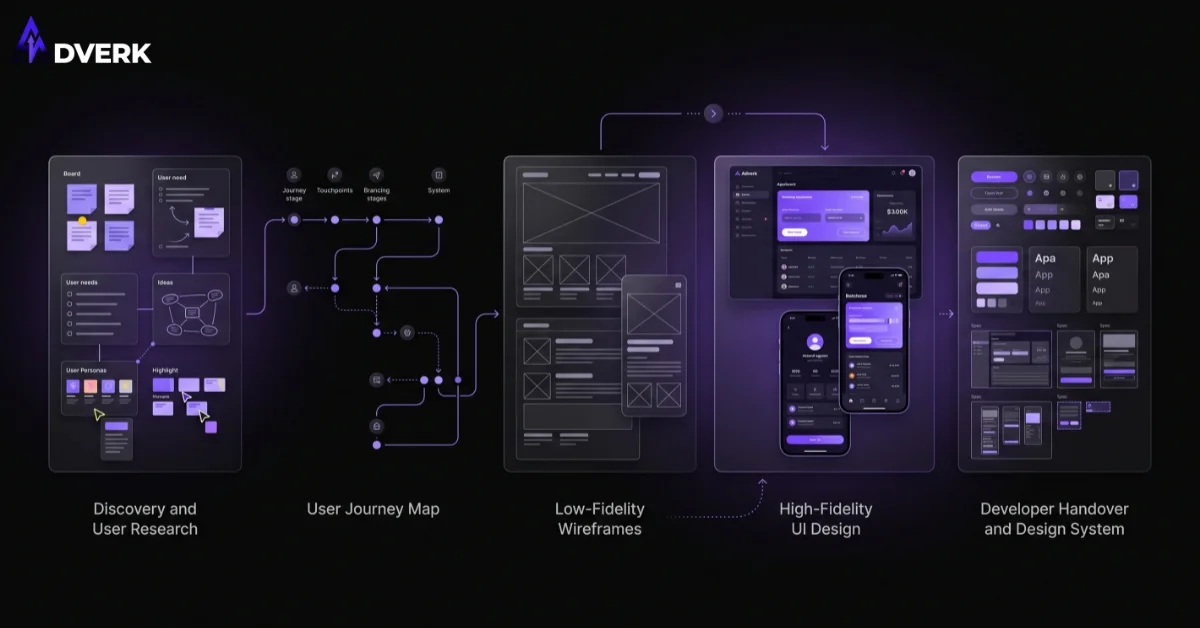
A structured UI/UX project generally moves through the same stages regardless of whether the end result is a website, app, or dashboard:
- Discovery — understanding the business, the audience, and what the interface actually needs to accomplish
- Structure planning — mapping the required screens, the user journey, and the key actions
- Wireframe direction — planning layout and flow before any final visuals are designed
- Visual design — the interface layer: colors, typography, spacing, components
- Feedback and revisions — reviewing against real use cases, not just how it looks in isolation
- Handover — final design files prepared for development
Skipping the earlier stages to jump straight to visual design is the most common way a UI/UX project ends up needing rework later — the interface looks fine, but the underlying flow still doesn’t hold up once real users interact with it.
What It Costs
UI/UX design pricing depends heavily on scope — a single landing page interface is a different project than a multi-screen SaaS dashboard or a full mobile app flow. Because the range is wide and depends entirely on how many screens and interaction states are involved, it’s worth treating this as a scoped quote rather than a flat number: describe the screens involved, whether it’s web, mobile, or both, and how many steps the core user journey has, and a fair quote should follow from that.
Frequently Asked Questions
What’s the actual difference between UI design and UX design?
UI is the visible layer of an interface: buttons, colors, layout, icons, and typography. UX is the experience underneath it: whether someone can actually complete what they came to do without friction or confusion. They’re designed together because a good-looking interface with a confusing flow, or a smooth flow with a cluttered interface, both fail for different reasons.
Is UI/UX design necessary for a small business website, or is that only relevant for apps?
It matters most wherever there’s a multi-step process — a quote request, a booking flow, a checkout, a signup form. A simple five-page brochure site with no real process to complete may not need a dedicated UI/UX engagement; a site with any kind of flow probably does, regardless of business size.
How is UI/UX design different from landing page design or full website design?
Landing page design is scoped to a single page built around one action, usually for a campaign. Full website or layout design covers the standard pages of a business site. UI/UX design is broader and more structural — it applies to any multi-screen flow, including apps, dashboards, and booking systems, not just marketing pages.
How do I know if my current website’s UX is actually hurting my business?
Look for concrete drop-off points rather than a general feeling that the site looks dated: people abandoning a form partway through, repeated support questions about how to do something the site should make obvious, or a noticeable gap between desktop and mobile completion rates. Those point to a UX problem specifically, separate from how the site looks.
Does UI/UX design work happen before or after development starts?
Before, in almost every case that goes well. UI/UX design defines the structure, flow, and interface before a single line of the final build starts, which is why skipping straight to development on a multi-step product usually costs more to fix later than it would have cost to plan properly up front.
How long does a UI/UX design project usually take?
It depends on how many screens and user journeys are involved — a single flow is a much shorter engagement than a full multi-screen app or dashboard. The discovery and structure-planning stages at the start are what determine the real timeline, which is why a scoped project brief matters more than a generic estimate.
If you’re not sure whether your website’s issue is visual, structural, or somewhere in between, book a free consultation and we’ll help you figure out which one it actually is before recommending a scope.