
Contrast in graphic design is the deliberate use of difference — in color, size, weight, or shape — to make specific elements stand out while others recede. It’s the reason a call-to-action button doesn’t get lost on a page, and the mechanism behind almost every other principle on this list.
The main types of contrast
Color contrast: a bright accent color against a neutral background, or dark text against a light background. Size contrast: a large headline next to small body text. Weight contrast: bold type against regular or light type. Shape contrast: a circular button among otherwise rectangular elements. Most strong designs layer two or three of these at once rather than relying on just one.
What contrast is actually for
Contrast does two jobs simultaneously: it creates hierarchy (telling the eye what to look at first) and it improves readability (making sure text is legible against its background). A page with no contrast — similar colors, similar sizes throughout — feels flat and directionless, even if every individual element is well designed. A page with too much contrast everywhere feels chaotic, because nothing recedes enough to let anything else lead.
Contrast and accessibility
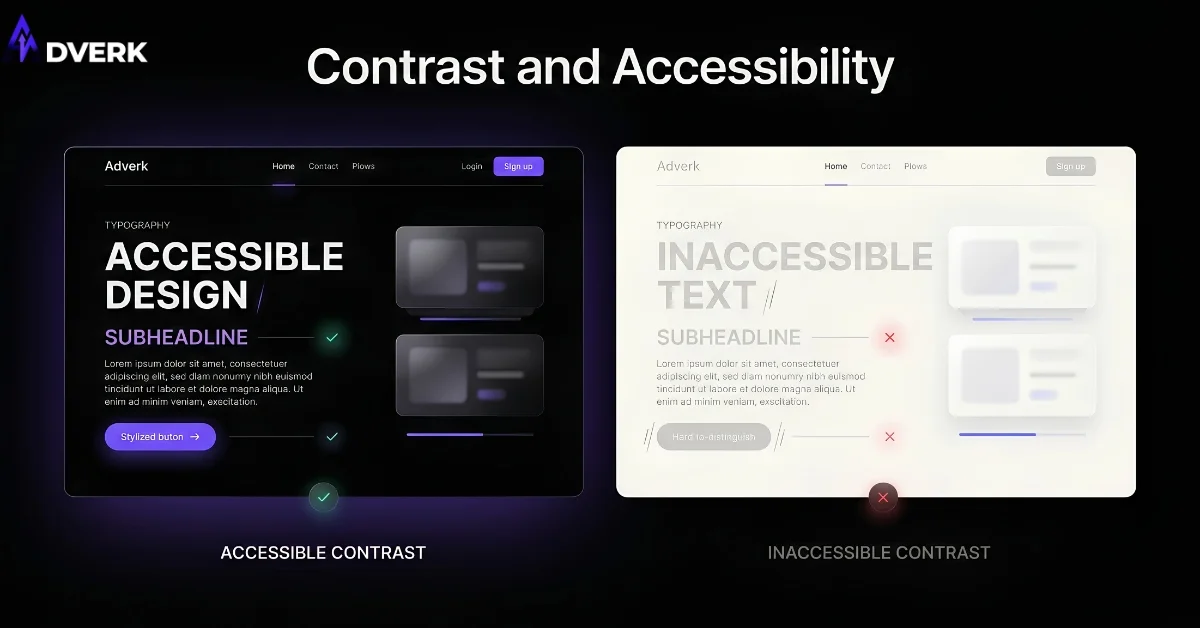
Color contrast between text and background isn’t just a design preference — it directly determines whether people with low vision or color blindness can read your content at all, and it affects readability for everyone in bright sunlight on a phone screen. Low-contrast text (light gray on white, pale colors on pale backgrounds) is one of the most common and most fixable accessibility failures on small business websites.
Common contrast mistakes
Using contrast everywhere, so nothing actually stands out relative to everything else. Relying on color alone for contrast without a backup in size or weight, which breaks for colorblind users or in grayscale printing. Choosing a brand accent color that’s too close in value to the background it’s usually placed on. And under-using contrast out of a fear of looking “too bold,” which usually just reads as indecisive rather than refined.
Contrast and the other principles
Contrast is the engine behind both hierarchy and emphasis — without it, neither principle has anything to work with. See how all six connect in our guide to the principles of graphic design.
Frequently Asked Questions
What’s the difference between contrast and emphasis?
Contrast is the tool — a difference in color, size, weight, or shape between two elements. Emphasis is the goal that tool serves: making one specific element the focal point. You create emphasis by applying contrast; contrast is how emphasis gets built, not a separate technique.
How much contrast is too much?
When everything on the page is competing for attention at once, none of it reads as important — that’s the sign you’ve overdone it. Strong layouts usually have one dominant contrast relationship (like a headline against body text) with everything else receding in support, not five equally loud elements fighting each other.
Does contrast always require color?
No. Size, weight, and shape can all create strong contrast on their own, which matters for accessibility since color-only contrast breaks down for colorblind users and in grayscale contexts like faxes or black-and-white printing. Pairing color contrast with at least one other type (usually size or weight) is the safer default.
How do I check if my contrast meets accessibility standards?
WCAG AA requires a contrast ratio of at least 4.5:1 for normal body text against its background, and 3:1 for large text. Free contrast-checker tools (like WebAIM’s Contrast Checker) let you plug in your exact text and background colors and get a pass/fail instantly — worth running on your primary text/background pairing before launch.
Can too little contrast hurt conversions?
Yes — if your call-to-action button is close in color or weight to everything around it, visitors’ eyes have no reason to land on it first, and it gets skipped. Low contrast between a CTA and its surroundings is one of the more common, easily fixable reasons a button gets seen but not clicked.
What’s a fast way to test contrast on my own site?
Squint at the page, or view a screenshot in grayscale. If you can still immediately tell what the most important element is with color removed, your contrast is doing real work through size and weight, not relying on color alone.
If your calls to action aren’t getting clicked, weak contrast is a common, overlooked cause. Adverk’s graphic design services build contrast in deliberately, not as an afterthought. Book a free consultation for a second opinion on your current materials.