
Why Layout Is the Part of Web Design Most Businesses Skip
Website layout design is the planning and structuring of your site’s key pages — homepage, about, services, contact, portfolio or product pages — before anyone touches colors or fonts. It answers three questions for every page: what does a visitor see first, what do they need to understand next, and what should they do before they leave. Get the layout right and the rest of the design has something solid to sit on. Get it wrong, and even good visuals can’t fix a site that confuses people about what your business does or how to contact you.
Most businesses jump straight to “make it look nice” and skip this step entirely, which is why so many small business websites end up with a homepage that tries to say everything at once, a services section that’s really just a bullet list, and a contact page buried three clicks deep. Layout design fixes that by treating structure as its own deliberate step — not something that just happens once a designer starts dragging elements onto a page.
Layout Planning Happens Before Visual Design, Not During It
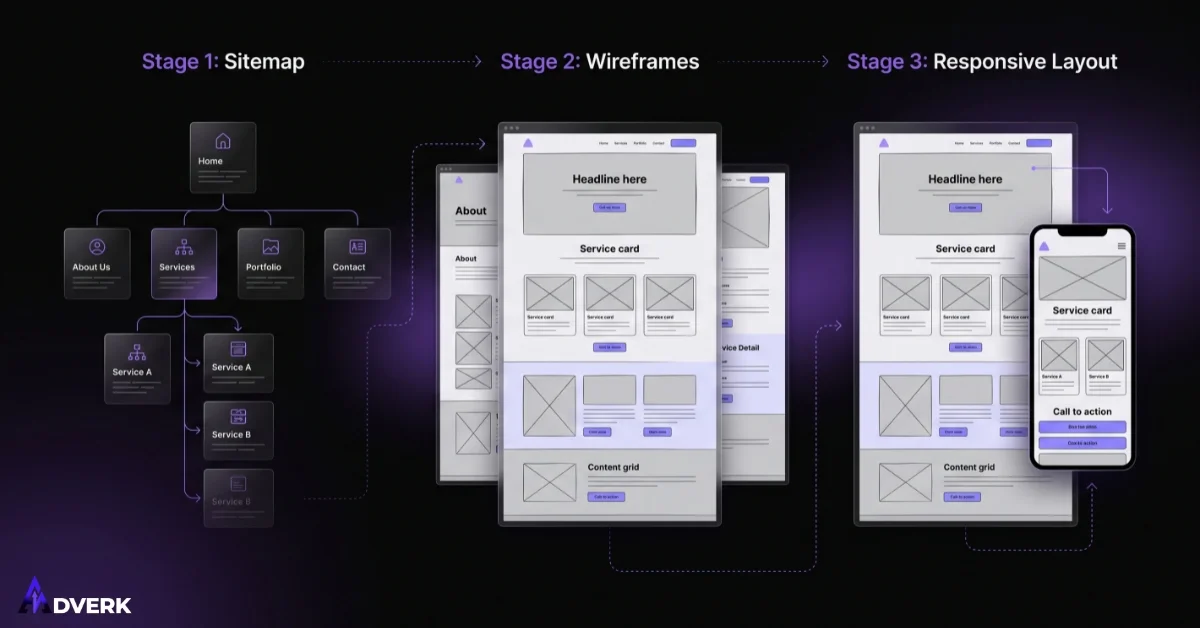
A proper layout process starts with a sitemap: a simple list or diagram of every page the site needs and how they connect to each other. For most small businesses this is shorter than people expect — home, about, two or three service pages, a contact page, and sometimes a portfolio or product page. The sitemap forces an early decision about what actually needs its own page versus what can live as a section on an existing one.
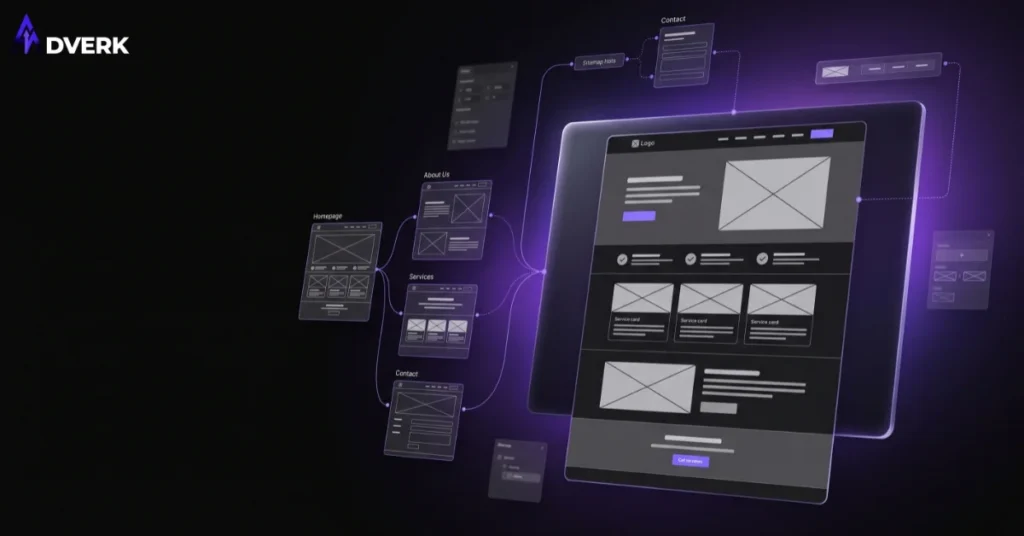
Once the sitemap is settled, each page gets a wireframe — a rough, colorless block-out of what sections go where, in what order, before any real copy or imagery is added. A homepage wireframe might block out a headline area, a short trust section, a services overview, and a call-to-action band, all before anyone decides what color those sections will be. This step matters because it’s far cheaper to move a box around on a wireframe than to redesign a finished page because the structure turned out wrong.
What a Good Layout Actually Does for Each Key Page
Homepage
The homepage layout has to work harder than any other page because it carries the widest range of visitors — some ready to buy, some just comparing options. A layout that leads with a clear statement of what the business does, follows with proof (client logos, numbers, testimonials), then narrows into specific services, gives every visitor type something to grab onto without forcing anyone to scroll through irrelevant sections first.
About Page
About pages perform badly when they’re laid out as a wall of text about the company’s history. A layout that separates “who we are,” “how we work,” and “why that matters to you” into distinct, scannable blocks turns a page people usually skip into one that actually builds trust before a visitor reaches the contact page.
Service Pages
Each service page needs its own layout logic: what the service includes, who it’s for, and a clear next step, in that order. Businesses that cram every service onto one page force visitors to hunt for the one thing they actually came for — a layout that gives each core service its own page, linked clearly from the homepage and navigation, consistently performs better for both usability and search visibility.
Contact Page
A contact page’s layout should remove friction, not add it. That means the form is visible without scrolling, alternative contact methods (phone, WhatsApp, email) sit next to it rather than buried below, and the page doesn’t ask ten questions when three would do.
Portfolio or Product Pages
For businesses that need to show past work or sell physical products, layout decides whether visitors can actually browse and compare, or whether they’re stuck squinting at a cluttered grid. A consistent card layout with clear categories or filters does more for conversion here than any individual image does.
Common Layout Mistakes That Quietly Hurt Conversions
- Everything competing for attention at once. When five different elements all fight to be the first thing a visitor notices, none of them win, and the page reads as noise.
- No clear reading order. A layout should guide the eye in a logical path — top to bottom, most important to least — not scatter information based on whatever fit best that week.
- Inconsistent structure across pages. If every service page follows a different layout pattern, visitors have to re-learn how to read your site on every click, which increases the chance they give up.
- Treating mobile as an afterthought. A layout built for desktop and then squeezed onto a phone usually breaks the reading order entirely, since most Pakistani visitors are browsing on mobile first.
- Burying the call to action. If someone has to scroll past several unrelated sections to find out how to contact you, the layout is working against the business, not for it.
How Website Layout Design Differs From Related Services
Layout design is easy to confuse with a couple of related services Adverk also offers, so it’s worth being specific about where each one starts and stops.
A landing page is a single, standalone page built around one offer and one action, usually with navigation removed. Website layout design, by contrast, is about planning how an entire multi-page site fits together — how the homepage connects to service pages, how visitors move between them, and how the whole structure supports both usability and SEO. A site can have both: a well-laid-out main website plus a dedicated landing page for a specific ad campaign.
UI/UX design goes a layer deeper than layout — it covers the specific buttons, forms, icons, and interaction patterns that make a laid-out page actually function smoothly, especially for more interactive products like booking systems or dashboards. Layout decides what sections exist and in what order; UI/UX decides how someone actually interacts with what’s inside those sections. Most small business websites need solid layout work; more interactive platforms often need both.
Signs Your Current Layout Needs Rework
A few patterns usually mean the underlying structure, not just the visual style, needs attention: visitors land on the homepage and can’t tell what you do within a few seconds, your services are listed as a single crowded paragraph instead of their own sections, your contact information is genuinely hard to find, or your site looks like it was built by adding pages over time with no consistent structure between them. These are layout problems specifically, separate from the broader set of warning signs covered in our guide on signs your website needs a redesign, which looks at the full picture including speed, design age, and conversion performance.
What Layout Design Costs
Layout work is typically priced as part of a broader website design or redesign project rather than sold on its own, since a layout only becomes useful once it’s built out with real content and visuals. The scope depends on how many pages need planning, whether it’s a brand-new site or a restructure of an existing one, and how much of the content already exists versus needs to be written from scratch. If you’re weighing a full restructure against smaller fixes, our website redesign pricing guide breaks down what drives cost on that side. For an exact number based on your specific pages and goals, a quick consultation is the fastest way to get one.
A Simple Layout Planning Checklist
- List every page the site actually needs — resist adding pages that don’t map to a real visitor goal.
- Sketch a rough wireframe for each key page before adding real copy or images.
- Give each core service its own page instead of stacking them on one.
- Put the most important information above the fold on every page, especially the homepage and contact page.
- Keep the section order consistent across similar pages so visitors don’t have to re-learn your site.
- Test the layout on mobile before finalizing it, since most visitors will see it there first.
Frequently Asked Questions
What’s the difference between website layout design and web design overall?
Web design is the broader term covering colors, typography, imagery, and every visual decision on a site. Website layout design is the specific step of deciding what sections and pages exist and in what order, before those visual decisions are applied. Layout is the blueprint; the rest of web design is what gets built on top of it.
How is website layout design different from UI/UX design?
Layout design decides which pages exist and how content is arranged within them — the structural blueprint. UI/UX design goes further into the specific interface elements and interaction patterns, like how a form behaves or how a multi-step booking flow feels to use. A simple business website mainly needs strong layout work; a more interactive product like a booking system or dashboard typically needs both.
How is a website layout different from a landing page?
A landing page is one standalone page built around a single offer and a single action, often with navigation removed entirely. Website layout design covers the structure of an entire multi-page site, including how visitors move between the homepage, service pages, and contact page. Many businesses use both: a well-structured main site plus separate landing pages for specific campaigns.
Do I need a sitemap and wireframe for a small business website, or is that overkill?
For most small businesses, this step is quick, not heavy. A sitemap for a five or six page site takes a short conversation to settle, and a rough wireframe for each page prevents costly restructuring later. Skipping it doesn’t save meaningful time; it just moves the same decisions later in the process, after content and visuals already exist and are harder to rearrange.
How many pages does a small business website actually need?
There’s no fixed number, but most small businesses cover their needs with a homepage, an about page, one page per core service rather than one shared page for all of them, a contact page, and sometimes a portfolio or product page. The right count depends on how many distinct services or product lines the business actually has, not on matching a template.
Can an existing website’s layout be improved without a full redesign?
Often, yes. If the visual design and branding are working but pages feel cluttered, confusing, or inconsistent with each other, restructuring the layout — splitting a crowded page into focused sections, reordering content, or giving each service its own page — can meaningfully improve usability without touching colors or fonts at all.
A website that’s easy to navigate and quick to understand starts with layout decisions made before a single color is chosen. If your site feels cluttered, inconsistent, or hard to explain to visitors in the first few seconds, we can walk through your current structure and show you exactly what a clearer layout would look like — book a free consultation to get started.